
Data is boring
But broken search results are worse

🚨 Alert: This article is dangerously practical—no AI buzzword bingo here. Oh, and did I mention? We have CODE. 🧑💻
𝐇𝐨𝐰 𝐝𝐨 𝐰𝐞 𝐤𝐧𝐨𝐰 𝐡𝐨𝐰 𝐭𝐨 𝐢𝐧𝐝𝐞𝐱 𝐨𝐮𝐫 𝐝𝐚𝐭𝐚?
Everybody today talks about AI Agents, new LLMs, or some fancy orchestrators.
But let's get back to the 𝐚𝐜𝐭𝐮𝐚𝐥 𝐀𝐈 𝐞𝐧𝐠𝐢𝐧𝐞𝐞𝐫𝐢𝐧𝐠 problems.
In a data pipeline for indexing PDFs, we face a fundamental challenge:
𝐍𝐨𝐭 𝐚𝐥𝐥 𝐏𝐃𝐅𝐬 𝐚𝐫𝐞 𝐜𝐫𝐞𝐚𝐭𝐞𝐝 𝐞𝐪𝐮𝐚𝐥.
Some PDFs are beautifully structured with clean text, while others are chaotic with dense layouts, tables, or images.
Ignoring these differences means risking ineffective indexing and poor search retrieval.
Think about it:
⭕ A PDF full of tables and charts requires an entirely different approach than a pure text PDF.
⭕ Traditional OCR and embedding methods might benefit a text-heavy document, but they fail miserably when dealing with visual elements like diagrams.
𝐓𝐡𝐢𝐬 𝐢𝐬 𝐰𝐡𝐲 𝐤𝐧𝐨𝐰𝐢𝐧𝐠 𝐰𝐡𝐚𝐭 𝐤𝐢𝐧𝐝 𝐨𝐟 𝐏𝐃𝐅 𝐲𝐨𝐮'𝐫𝐞 𝐝𝐞𝐚𝐥𝐢𝐧𝐠 𝐰𝐢𝐭𝐡 𝐢𝐬 𝐜𝐫𝐢𝐭𝐢𝐜𝐚𝐥.
So, today, I will discuss how important it is to understand your PDF structure before deciding what kind of embedding method to apply.
I will also go deeper into Colpali for multimodal document retrieval.
What is Colpali?
ColPali is a novel document retrieval model that leverages the power of Vision Language Models (VLMs) to efficiently index and retrieve information from documents based solely on their visual features.
Using ColPali removes the need for potentially complex and brittle layout recognition and OCR pipelines. It uses a single model that can consider both the textual and visual content (layout, charts, tables) of a document.
But is it true? Do we always need this kind of model?
I want to create a benchmark in future articles to see the difference between ColPali and Traditional Document Retrieval.
Table of contents:
Data indexing pipeline → architecture overview
PDF embedding detector
PDF data preparation → Colpali
Indexing PDFs with Vespa → vector DB
Next articles & Conclusion
1. Data indexing pipeline → architecture overview
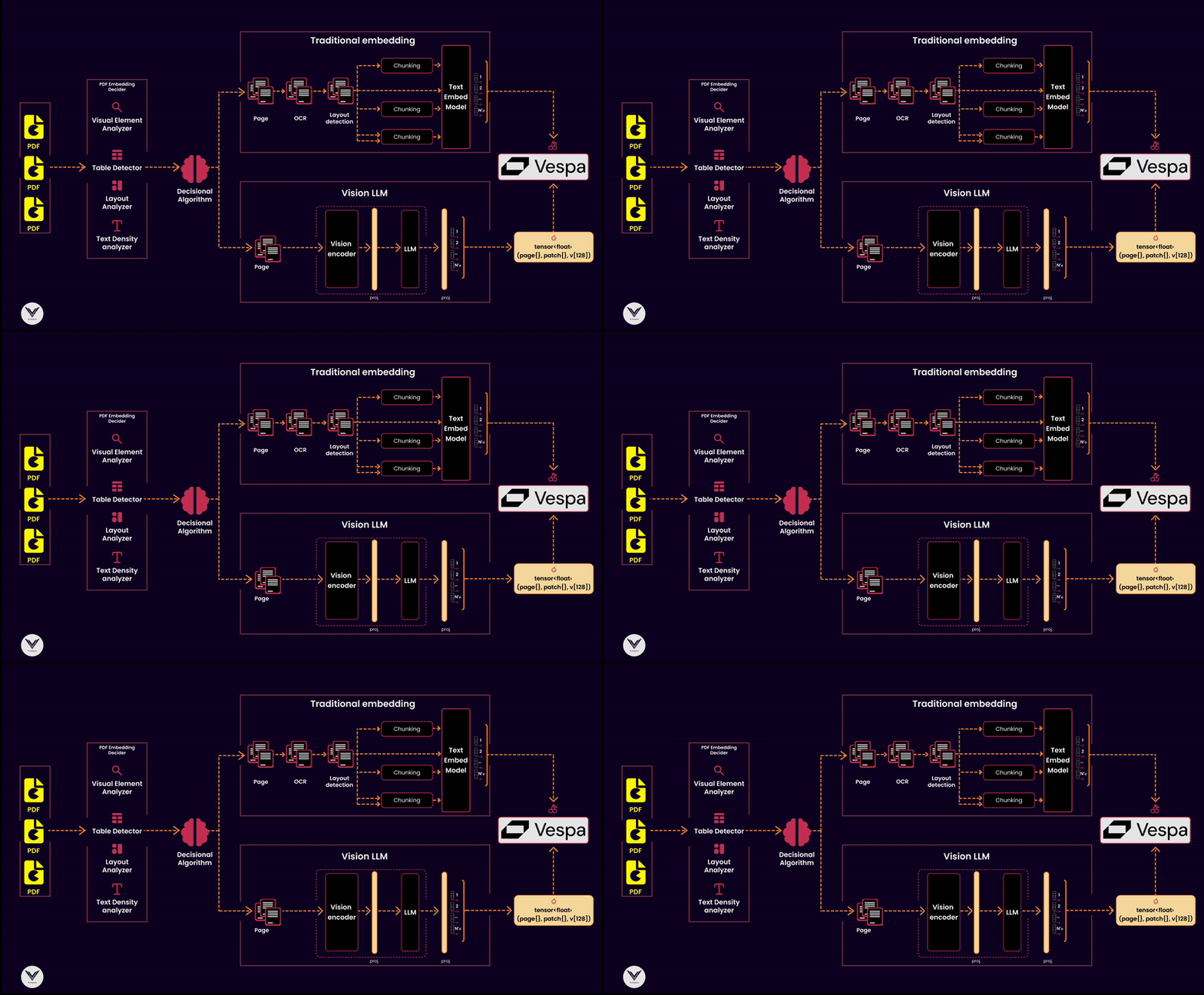
I won’t discuss architectural decisions like scaling this indexing pipeline to thousands of PDFs or choosing a framework to paralyze different data flows.
I want you to understand the principles of an indexing pipeline.
Aligning the architecture with the nature of the documents you are working with is essential when building a robust data indexing pipeline.
The diagram shows that the pipeline has distinct components that serve a specific purpose: ensuring documents are processed, analyzed, and indexed to optimize retrieval.
Components of the Pipeline:
PDF Reader
The starting point of any pipeline is the PDF reader. Its job is to extract pages and pass them downstream. A high-quality reader ensures no lost information, whether the content is text-heavy, image-dense, or filled with tables and graphs.PDF Embedding Decider
Not all PDFs are created equal, so it's critical to decide which embedding strategy to use. This decider analyzes the document's structure, using tools like a layout analyzer, visual element detector, or text density analyzer, to classify whether a traditional text embedding or a multimodal vision embedding is appropriate.Decisional Algorithm
The algorithm sits at the heart of the pipeline, making informed decisions based on input from the embedding decider. For instance:Text-heavy documents can go directly through OCR and text embedding models.
Documents with tables or dense layouts may bypass OCR in favor of a visual language model (e.g., ColPali) to extract both textual and visual semantics.
Embedding Models
Embedding models are responsible for turning document content into vectors for indexing. The pipeline supports:Traditional embeddings: Suitable for documents with clean text extracted via OCR.
Vision Language Models (VLMs): Handle the complexity of multimodal documents, recognizing both text and visual structures like tables, charts, and diagrams.
Chunking Strategy
Chunking divides the document into manageable parts for processing and embedding. Effective chunking considers:Layout-based chunking for visual embeddings.
Text density and structure for traditional embeddings. This ensures that embeddings retain the context of each chunk without overwhelming the downstream vector database.
Vector Database
A vector database like Vespa serves as the backbone of retrieval, storing the embeddings and allowing similarity searches. Vespa can also integrate metadata to improve relevance by associating vectors with key attributes like document type, page number, or detected visual features.
2. PDF embedding detector
It dynamically decides the embedding strategy by analyzing each document's structural and visual characteristics.
The detector consists of four components, each addressing specific aspects of document analysis:
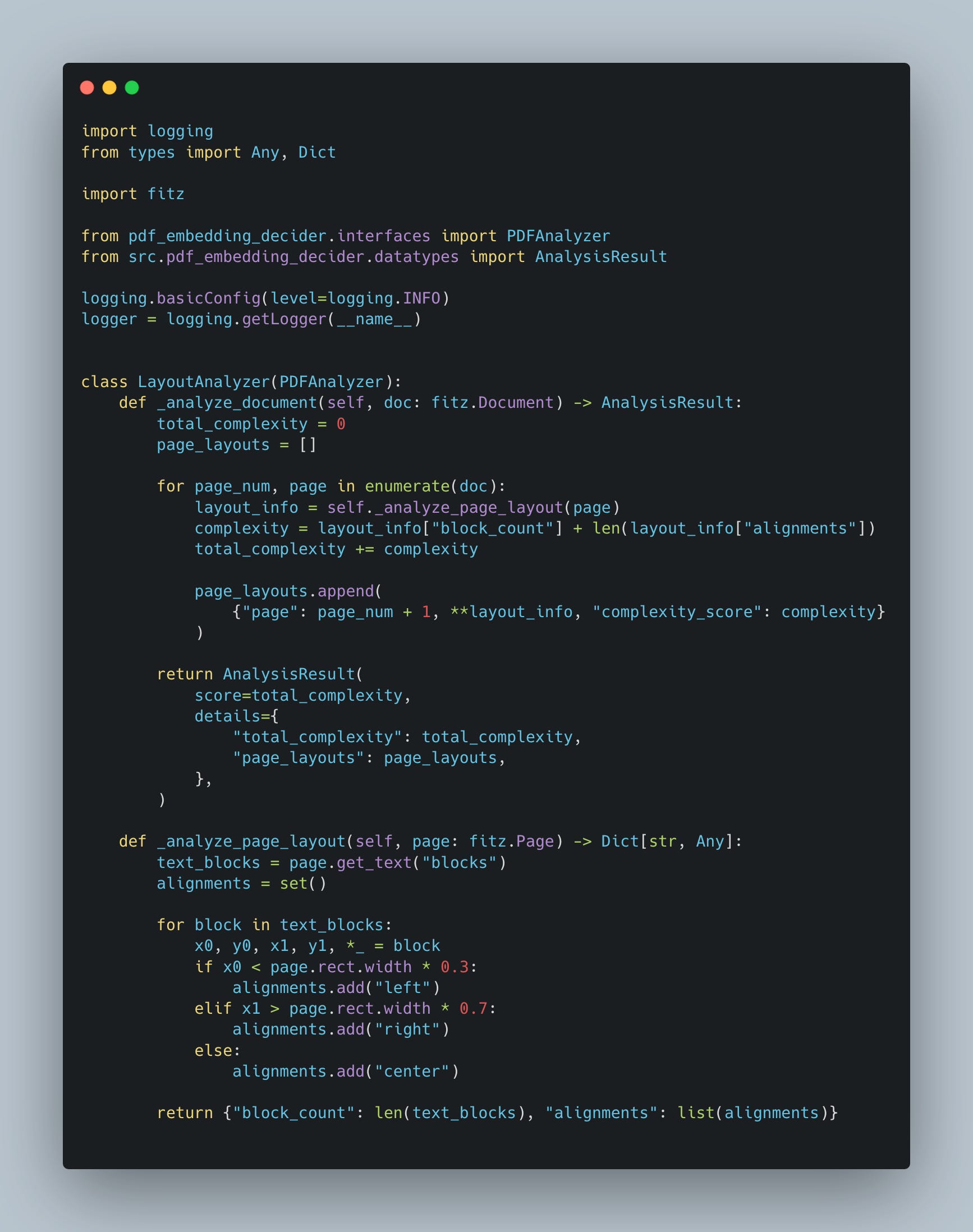
2.1 LayoutAnalyzer
The LayoutAnalyzer evaluates the structural layout of a PDF page. It determines a document's complexity by analyzing the number of text blocks and their alignments (left, right, or center). This helps assess whether the document is text-heavy or visually intricate.
Key Features:
Block Counting: Counts text blocks to measure the density and fragmentation of text across the page.
Alignment Detection: Identifies alignments (left, right, center) based on block positions relative to the page width.
Complexity Score: Aggregates complexity scores for each page to provide an overall measure of document layout complexity.
Example Use Case: Detecting if a document has a simple text-based layout (e.g., articles) or a fragmented layout with multiple sections (e.g., reports or magazines).
2.2 TextDensityAnalyzer
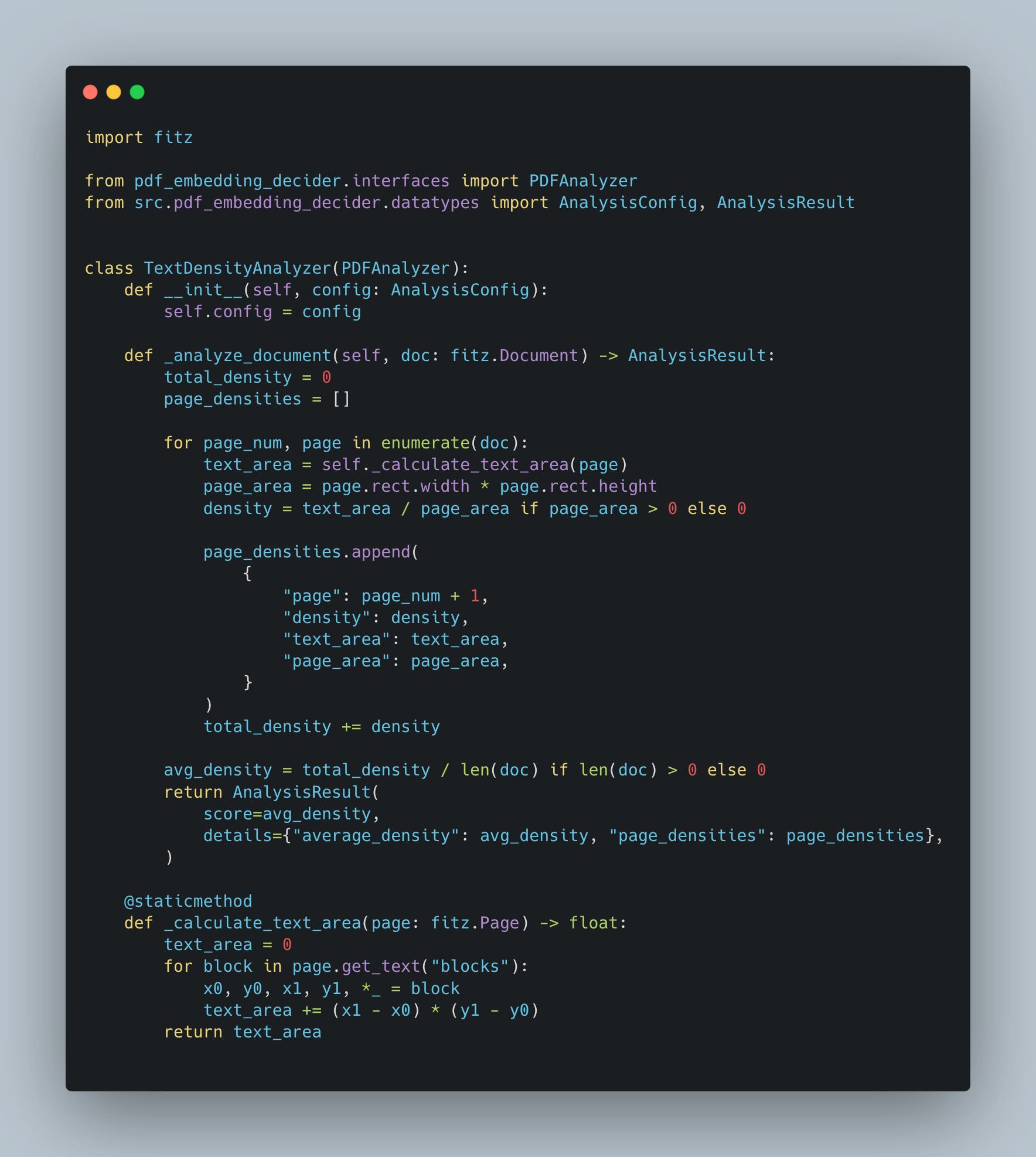
The TextDensityAnalyzer quantifies the amount of text on each page by calculating the ratio of the text area to the total page area. This analysis is vital for determining whether a document is text-heavy or contains significant whitespace and images.
Key Features:
Text Area Calculation: Measures the cumulative area of text blocks on a page.
Density Calculation: Computes text density as a ratio of text area to page area.
Average Density Score: Provides an overall density score across all pages, enabling a macro-level analysis of the document.
Example Use Case: Differentiating between documents with dense paragraphs (e.g., academic papers) and those with sparse text (e.g., slide decks or advertisements).
2.3 VisualElementAnalyzer
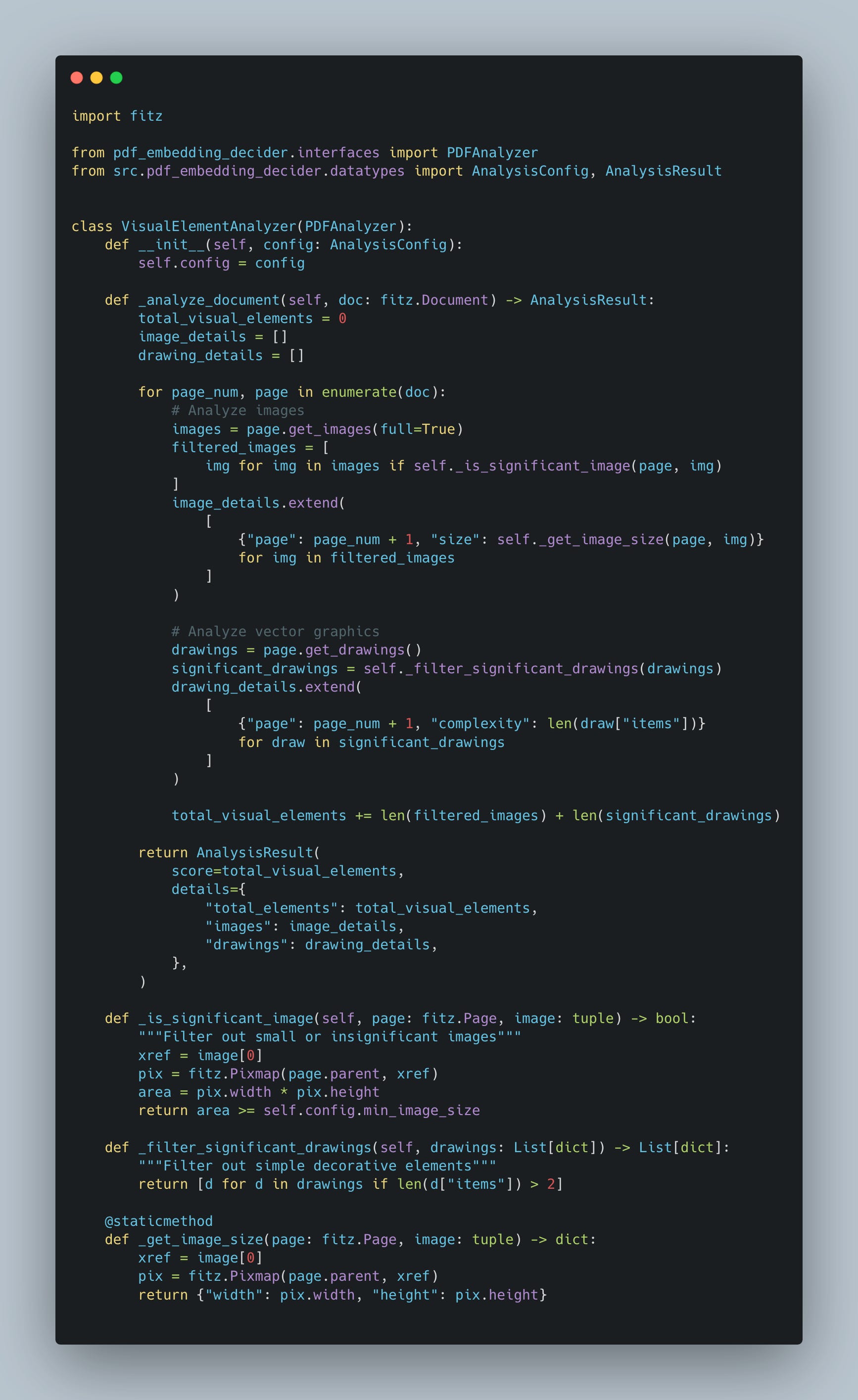
The VisualElementAnalyzer focuses on identifying the presence and distribution of visual elements like images, graphs, and diagrams. These elements are critical for understanding the visual structure of a document and deciding whether to employ a Vision Language Model (VLM) for embedding.
Key Features:
Visual Element Detection: Scans pages for non-textual elements.
Distribution Analysis: Identifies how visual elements are spread across the document.
Contextual Importance: Highlights sections where visual elements dominate over text.
Example Use Case: Recognizing the presence of diagrams in technical manuals or images in marketing materials that require multimodal embeddings.
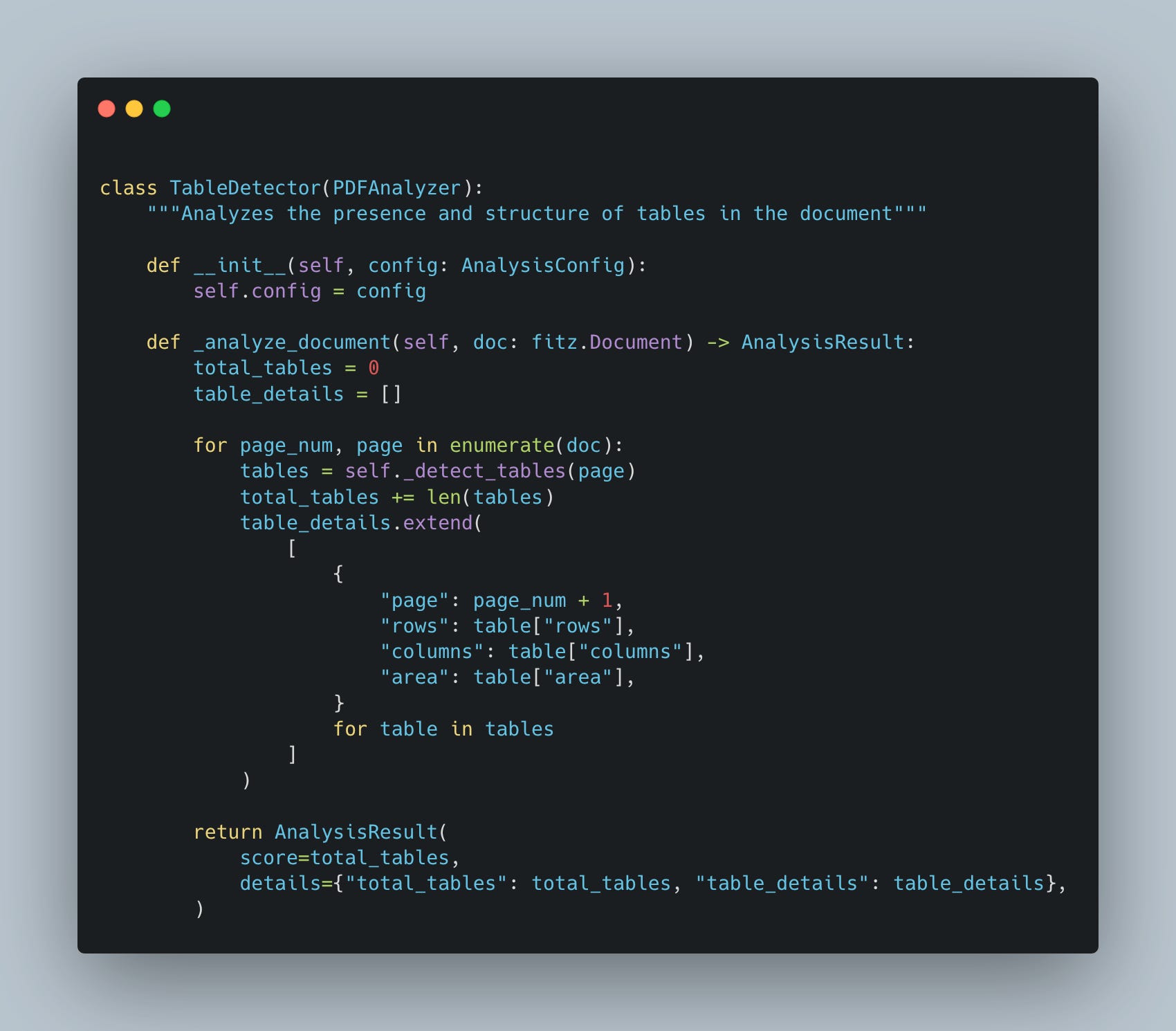
2.4 TableDetector
The TableDetector is designed to identify and analyze tables in a PDF document. Tables often contain structured data that requires special handling for effective indexing and retrieval.
Key Features:
Table Detection: Identifies tables based on text block alignment and spacing.
Row and Column Estimation: Calculates the number of rows and columns in each table.
Table Area Calculation: Determines the physical area occupied by a table on the page.
Table Clustering: Groups text blocks into table-like structures using positional clustering algorithms.
Example Use Case: Extracting tabular data from financial reports or scientific papers, where tables provide dense and structured information.
3. PDF Data Preparation
One of the most crucial parts of any AI project is data preparation. We have several PDFs, and our first thought is to process them using LLamaindex or Langchain, right?
But let’s go back 10 years. What was your first thought when you received a folder with PDFs?
My thought always was to analyze and understand them.
We already did that in part 2, where we did a couple of analyses, such as text structure, table detection, how many images, and so on.
The next step is to generate embeddings. I won’t go into the details of why we need embeddings and how to create traditional embeddings. For this case, we will focus on Colbert.
Since Colbert relies on embeddings that represent visual content, the first step in our pipeline is extracting content from the PDFs.
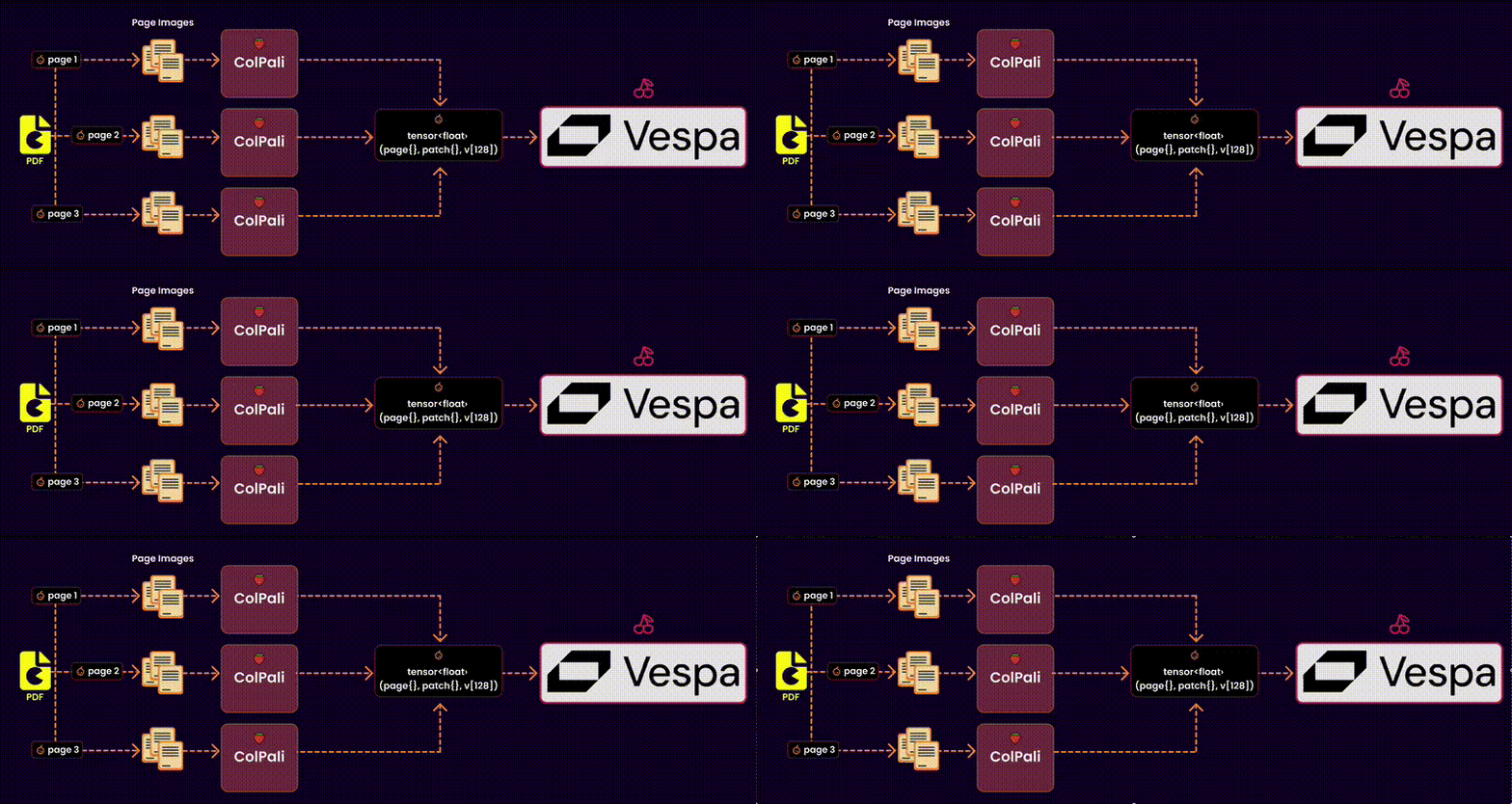
Here’s how it works:
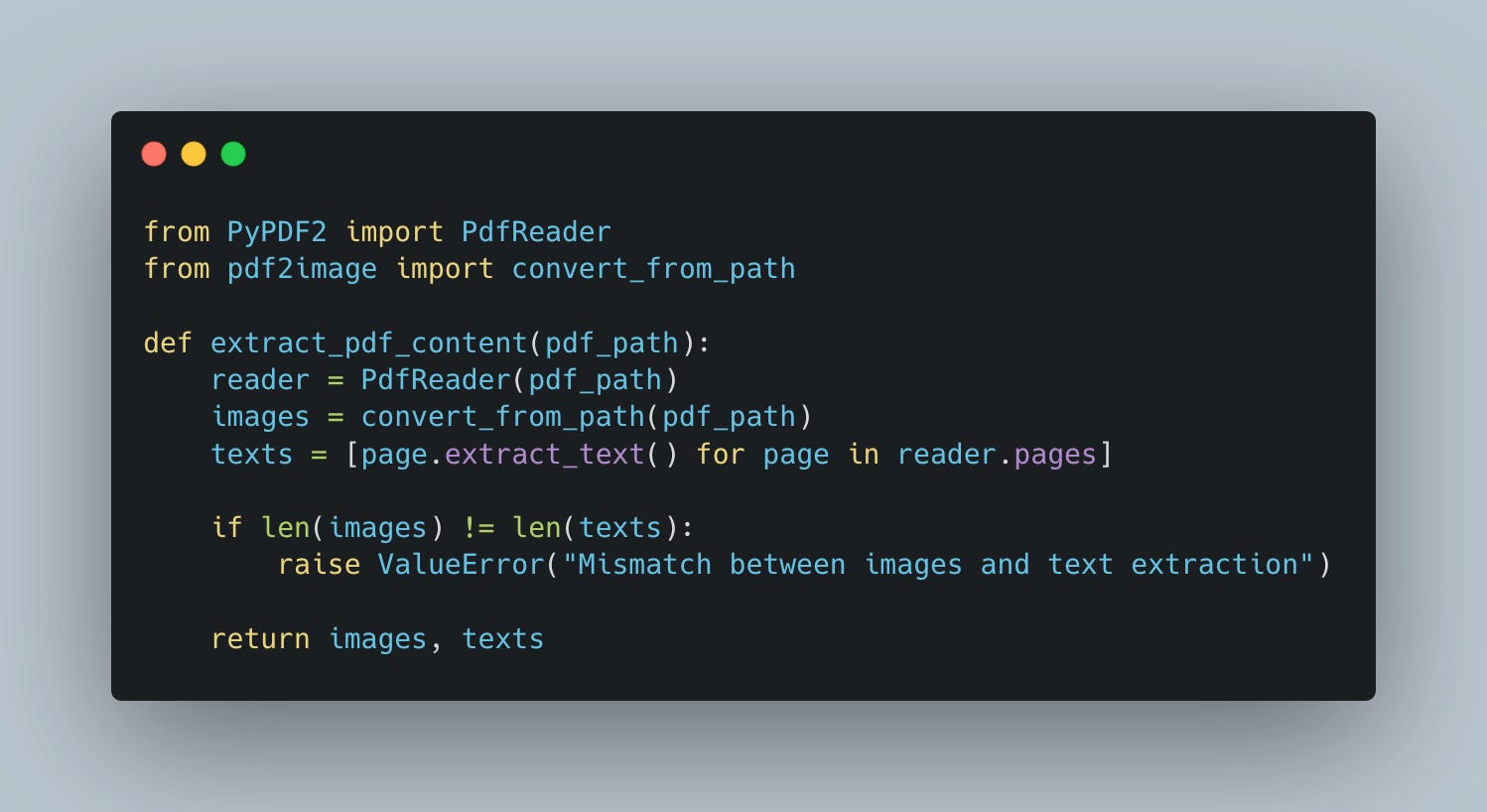
Step 1: Extract Images and Text from PDF
Why do we extract images? Not all PDFs are text-based. Some contain charts, diagrams, and layouts that need to be captured visually for effective embeddings.q
Workflow:
Download the PDF: Using a reliable HTTP library, fetch the PDF file from a URL or storage location. (for this example, I considered that the pdfs will be downloaded from some storage/bucket)
Convert to Images: Each page of the PDF is converted into an image. This ensures we capture the visual context, including charts, tables, or illustrations, without losing fidelity.
Extract Text: Simultaneously, the text content of each page is extracted using a PDF reader. This gives us the raw textual data necessary for embedding.
Pro Tip: Always ensure there’s a match between the number of pages converted into images and the text extracted. A mismatch could indicate processing issues that need to be debugged.
Step 2: Choose the model
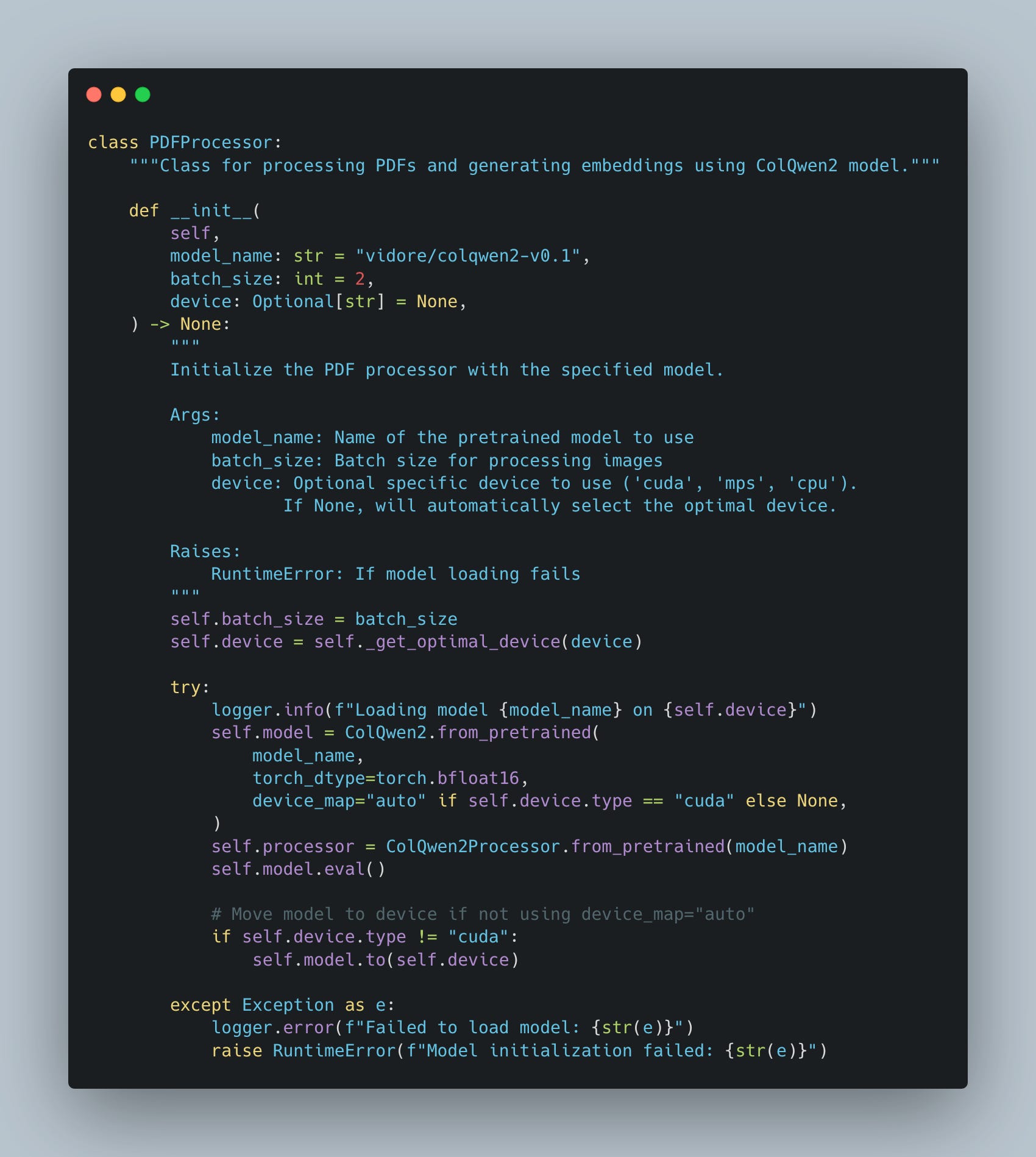
The choice of model directly impacts the quality of the embeddings. In our case, we use ColQwen2, a model designed for multimodal document processing. Here’s why this step is essential:
Textual vs. Visual Focus: Some PDFs might be text-heavy, while others may lean heavily on visual elements like diagrams or tables. ColQwen2 is ideal for handling both types of content effectively.
Pretrained Power: Leveraging a pre-trained model reduces the need for extensive training while ensuring high-quality embeddings.
Tip: Always select a model compatible with your dataset’s nature. For multimodal documents, ensure the model can process both text and images seamlessly.
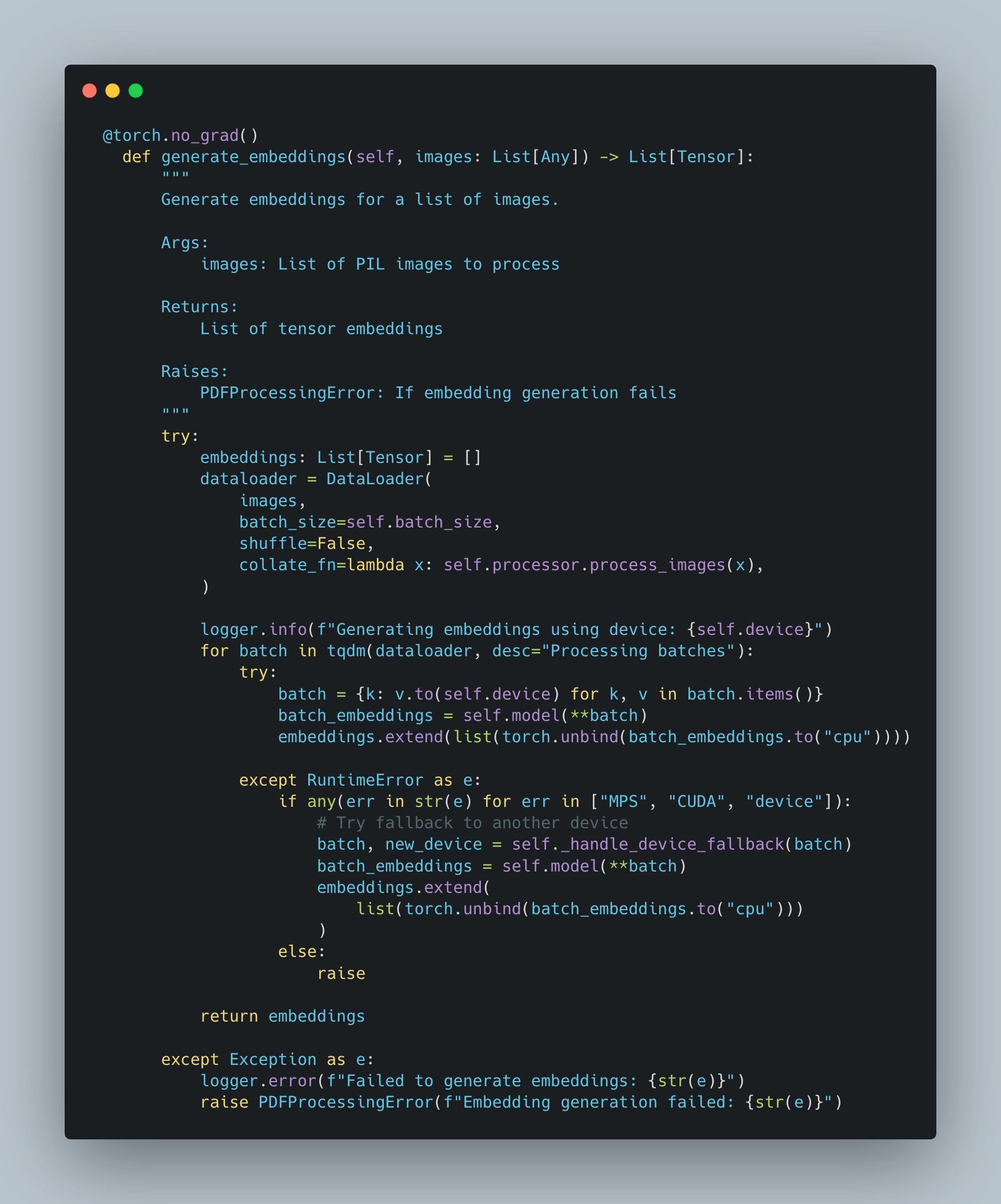
Step 3: Generate the embeddings
After extracting the content and selecting the right model and device, the next logical step is to generate embeddings. These embeddings are high-dimensional representations of the document content, making it possible to compare, search, and retrieve relevant data efficiently.
I utilize a batch-based approach for efficient processing to create embeddings for the visual content (images). Here’s how it works:
Prepare the Data:
Convert the list of images into a format suitable for the model using a processor.
Use a data loader to handle batching and ensure smooth processing of large datasets.
Forward Pass Through the Model:
Each batch of images is passed through the model on the selected device.
The model outputs embeddings for each image in the batch.
Handle Device Errors Gracefully:
If the primary device fails (e.g., due to memory issues), the pipeline falls back to a secondary device (e.g., CPU).
Collect Embeddings:
The embeddings are gathered and converted to CPU tensors for further use.
4. Indexing PDFs with Vespa
Vespa is a fully featured search engine and vector database. It supports vector search (ANN), lexical search, and structured data search in the same query.
Also, Vespa supports multi-vector indexing.
Why is multi-vector indexing important nowadays?
Traditional indexing methods often rely on a single vector to represent an entire document. However, PDFs frequently contain diverse content types—text, images, tables, and more—that a single vector may not adequately capture. Multi-vector indexing allows each document to be represented by multiple vectors, each encapsulating different facets of the content. This approach enhances semantic search capabilities, enabling more nuanced and relevant search results.
Multi-vector indexing enables us to represent different aspects of a document using separate embeddings. For example:
Textual Embeddings: Capturing the semantics of the written content.
Visual Embeddings: Representing the layout, diagrams, or charts within the document.
This approach is critical because it allows search and retrieval systems to account for the multifaceted nature of PDFs:
Multimodal Data: Many documents contain both textual and visual elements. By indexing both modalities, we ensure neither is overlooked.
Query Diversity: Users might search for different aspects of a document. For example:
A technical term might be embedded in the text.
A specific chart or layout might be the target of a visual query.
Improved Retrieval Accuracy: By combining multiple vectors during a search, the system can better match queries with relevant results.
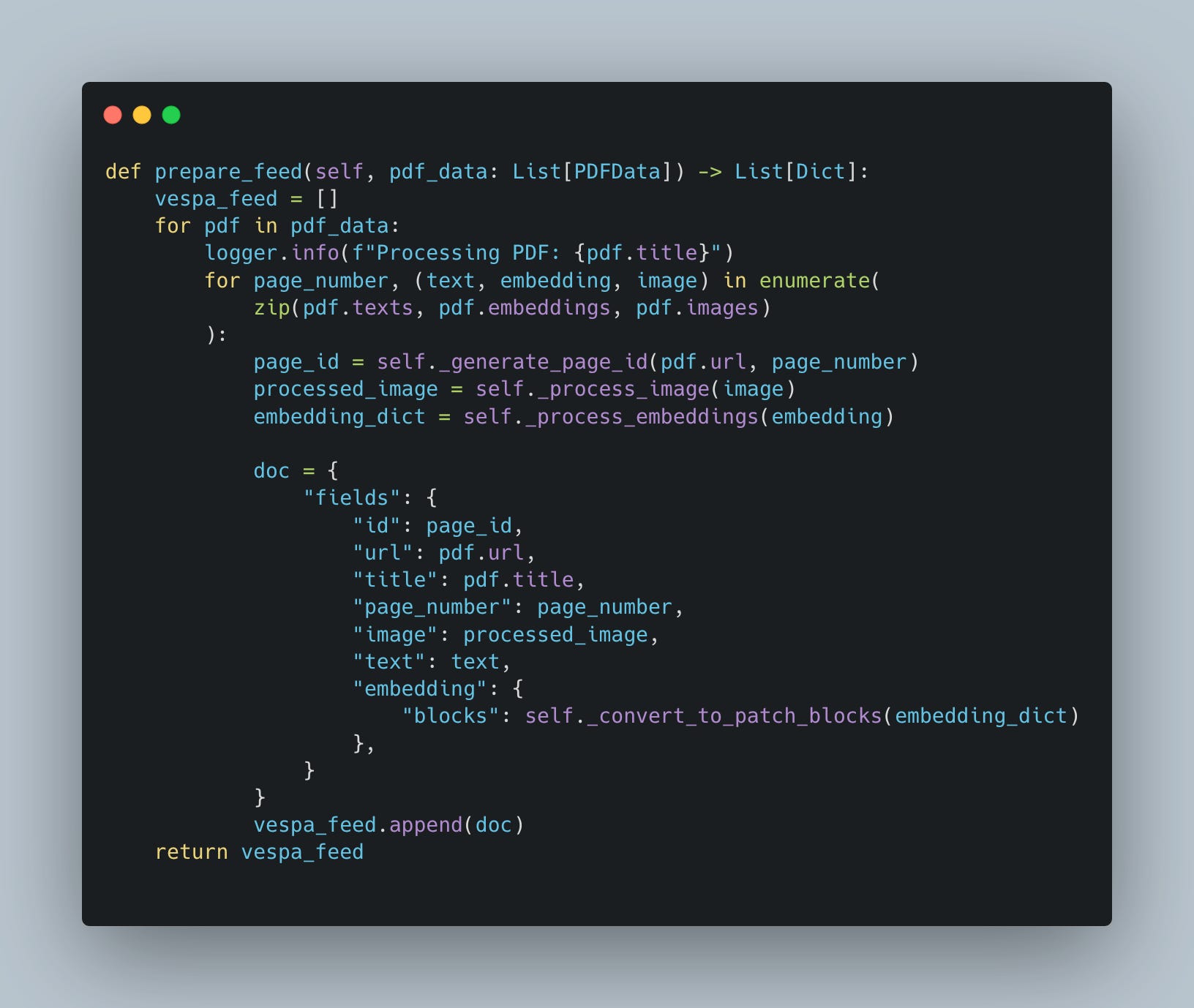
Once we have generated embeddings and processed our PDF content, the next critical step is feed preparation. Feed preparation involves structuring the extracted data—text, embeddings, images—into a format that can be seamlessly indexed by Vespa. This step is essential for enabling Vespa's powerful multi-vector indexing capabilities and ensures our data is both searchable and retrievable.
What Is Feed Preparation?
Feed preparation is the process of transforming raw extracted content into a structured dataset that Vespa can understand. Think of it as packaging your data so Vespa knows how to handle it during indexing and retrieval.
Each PDF, divided into pages, is represented as a collection of structured "documents" in the feed. These documents contain:
Text Content: The raw text extracted from each page.
Image Data: Processed images (e.g., resized and Base64-encoded).
Embeddings: High-dimensional vector representations of the text and images.
Steps in Feed Preparation
Page-Level Document Creation: Each page in a PDF is treated as a distinct document. This granular approach allows Vespa to retrieve specific pages instead of entire documents, improving the precision of search results.
Generate Unique Identifiers: Every page needs a unique identifier to distinguish it in the Vespa index. This can be achieved by hashing the PDF URL and page number.
Prepare and Format the Data:
Text: Clean and include the extracted text for lexical searches.
Images: Resize and encode images into Base64 for storage and retrieval.
Embeddings: Convert embeddings into patch-based blocks to facilitate fine-grained multi-vector retrieval.
Create the Vespa Feed: Package all these elements into a JSON-like structure compatible with Vespa's indexing schema.
5. Next articles & Conclusion
Conclusion:
Embedding Generation:
Leveraging multimodal models like ColQwen2 ensures both textual and visual elements are captured.
Batch processing and fallback mechanisms optimize embedding generation for large datasets.
Understanding PDF Structure:
Not all PDFs are created equal. Identifying whether a document is text-heavy, image-dense, or a mix of both is essential for choosing the right embedding strategy.
Tools like layout analyzers, text density detectors, and visual element analyzers help categorize PDFs effectively.
Feed Preparation:
Dividing PDFs into page-level documents ensures granular control during retrieval.
Structuring data with text, images, and patch-based embeddings allows Vespa to utilize multi-vector indexing effectively.
The Role of Multi-Vector Indexing:
Enables representation of diverse content types like text, tables, and images.
Enhances semantic search by combining textual and visual relevance scores.
Supports fine-grained retrieval, catering to multimodal queries.
Next Steps
In the upcoming articles, we will dive deeper into the Vespa setup:
Defining the Schema: We will look at how to design a Vespa schema that supports multi-vector indexing, including fields for text, images, and embeddings.
Creating a Ranking Profile: Learn how to configure Vespa's ranking profiles to combine multi-vector scores effectively, prioritizing relevance based on your use case.
Retrieval and Benchmarking: Finally, we’ll implement and evaluate the retrieval process, comparing results across different configurations and benchmarking performance against other retrieval models.
👀 Want to explore the complete code and see it in action?
How do I create the first dynamic graph in the Data indexing pipeline architecture overview chapter?